2012 – Day 05: laser show
2012-12-05 von Mario
Kategorie: Allgemein Schlagwörter: Weihnachten

Es gibt das Interessante und das Relevante. Nicht immer ist das Interessante relevant, häufig ist es nur interessant.
Nicht der Wind, sondern das Segel bestimmt die Richtung.
von Chinesisches Sprichwort
Colossal – A blog about art and visual ingenuity.
CONTEMPORIST – Blog über Architektur
CrispMe – Home of Inspirational Creative Works
1337day – Exploits
Peter Kröner – Blog über Webtechnologien
SemperVideo – Video Blog über IT-Themen
Zitate Online – Jeden Tag ein neues Zitat
Nimm an, was nützlich ist. Lass weg, was unnütz ist. Und füge das hinzu, was dein Eigenes ist.
von Bruce Lee
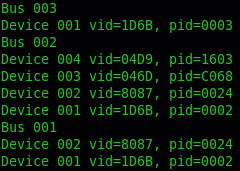
Mit diesem Beispiel können alle angeschlossenen USB-Geräte, unter Linux, ausgelesen werden.
Das Ergebnis sieht wie folgt aus.
Zum Vergleich, die Ausgabe von dem Befehl lsusb.

Damit das Programm auch kompiliert, wird eine Library benötigt.
Installation der USB Library
sudo apt-get install libusb-dev
Compile
gcc find_usb.c -o find_usb.o -lusb
Code
#include <stdio.h>
#include <stdlib.h>
#include <usb.h>

int main()
{

    struct usb_bus *bus;
    struct usb_device *dev;

    usb_init();
    usb_find_busses();
    usb_find_devices();

    for (bus = usb_get_busses(); bus; bus = bus->next)
    {

        printf("Bus %s \n", bus->dirname);

        for (dev = bus->devices; dev; dev = dev->next)
        {
            printf("Device %s vid=%04X, pid=%04X\n", dev->filename,
            dev->descriptor.idVendor, dev->descriptor.idProduct);
        }
    }

    return 0;
}
Viel Spaß damit! :)
Das Netz interpretiert Zensur als Schaden und sucht nach Umwegen.
von John Gilmore
Schade, dass die meisten sofort aufhören zu rudern, wenn sie endlich ans Ruder gekommen sind.
von Alfred Polgar
Vor einiger Zeit habe ich meine Conky Konfiguration hier vorgestellt. Hier ein kleines Update. :)
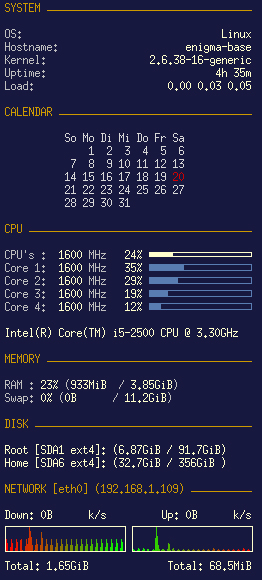
Installation von Conky:
sudo apt-get install conky
Für die automatische Ausführung von Conky, bei jedem Systemstart, wird ein Script („conky_delay_start.sh“) benötigt.
#!/bin/bash
sleep 20 && conky;
Danach noch die Rechte setzen.
chmod 755 conky_delay_start
Unter Ubuntu kann das Script unter System | Einstellungen | Startprogramme eingestellt werden.
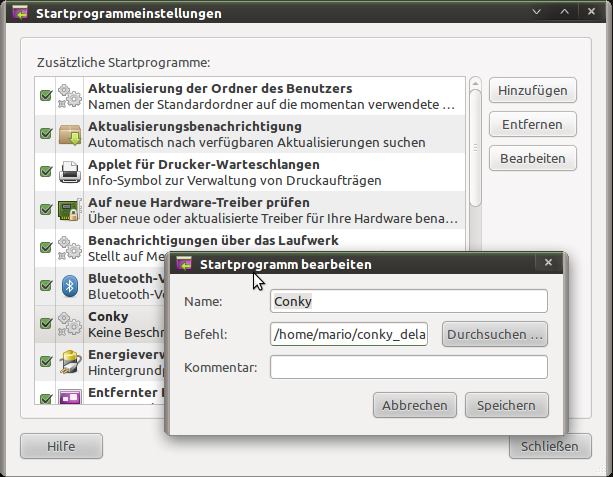
Das wars, jetzt startet Conky automatisch.
Meine Konfiguration
# CONKY

own_window yes
own_window_type override
own_window_hints below

# Use double buffering
double_buffer yes
# fiddle with window
use_spacer yes
use_xft no
# Update interval in seconds
update_interval 3.0
#Maximum Width of Window
maximum_width 320
# Minimum size of text area
# minimum_size 250 5
# Draw shades?
draw_shades no
# Text stuff
draw_outline no
draw_borders no
font arial
uppercase no
# Stippled borders?
stippled_borders 3
# border margins
border_margin 5
# border width
border_width 6
# Default colors and also border colors, grey90 == #e5e5e5
default_color FFFFCC
own_window_colour brown
own_window_transparent yes
# Text alignment, other possible values are commented
#alignment top_left
alignment top_right
#alignment bottom_left
#alignment bottom_right
# Gap between borders of screen and text
gap_x 10
gap_y 10
# stuff after ‘TEXT’ will be formatted on screen
TEXT
${color CC9900}SYSTEM ${hr 1}$color

${color grey}OS: $alignr$color$sysname
${color grey}Hostname: $alignr$color$nodename
${color grey}Kernel: $alignr$color $kernel
${color grey}Uptime: $alignr$color $uptime_short
${color grey}Load: $alignr$color $loadavg

${color CC9900}CALENDAR ${hr 1}$color

${color d7d7d7}${font Ubuntu:style=Bold:size=10}${execpi 60 VinDSL_Cal_8=`date +%-d`;
cal -h | sed -e '1d' -e 's/\/${color cc0000}&${color d7d7d7}/' -e 's/^/${offset 60}/'}
${color CC9900}CPU ${hr 1}$color

${color grey}CPU's : $color ${freq cpu0}${color grey} MHz  $color $cpu% ${cpubar 4}
${color grey}Core 1: $color ${freq 1}${color grey} MHz
$color ${cpu cpu1}% ${color 597DB2}${cpubar cpu1}$color
${color grey}Core 2: $color ${freq 2}${color grey} MHz
$color ${cpu cpu2}% ${color 597DB2}${cpubar cpu2}$color
${color grey}Core 3: $color ${freq 3}${color grey} MHz
$color ${cpu cpu3}% ${color 597DB2}${cpubar cpu3}$color
${color grey}Core 4: $color ${freq 4}${color grey} MHz
$color ${cpu cpu4}% ${color 597DB2}${cpubar cpu4}$color

${exec cat /proc/cpuinfo | grep 'model name' | uniq | cut -c 14-80}

${color CC9900}MEMORY ${hr 1}

${color grey}RAM : $color$memperc% ${color grey}($color${mem}
${color grey}/ $color${memmax}${color grey})
${color grey}Swap: $color$swapperc% ${color grey}($color${swap}
${color grey}/ $color${swapmax}${color grey})

${color CC9900}DISK ${hr 1}$color

Root [SDA1 ${fs_type}]: (${fs_used /} / ${fs_size /})
Home [SDA6 ${fs_type}]: (${fs_used /home} / ${fs_size /home})

${color CC9900}NETWORK [eth0] (${addr eth0}) ${hr 1}$color

Down: $color${downspeed eth0} k/s ${alignr}Up: ${upspeed eth0} k/s
${downspeedgraph eth0 25,120 ff0000 00ff00}
${alignr}${upspeedgraph eth0 25,120 00ff00 ff0000}$color
Total: ${totaldown eth0} ${alignr}Total: ${totalup eth0}